Analog Input using Arduino

To pursue a highly rewarding career, seeking for a job in challenging and healthy work environment where I can utilize my skills and knowledge efficiently for organizational growth. Seeking a beginners role to explore and enhance my technical knowledge gained at University in the last few years. I am looking for a responsible job with an opportunity for professional challenges and self development that enables me as a fresh graduate to grow while fulfilling organizational goals
In this blog, I will show you how to create an analog input using Arduino.
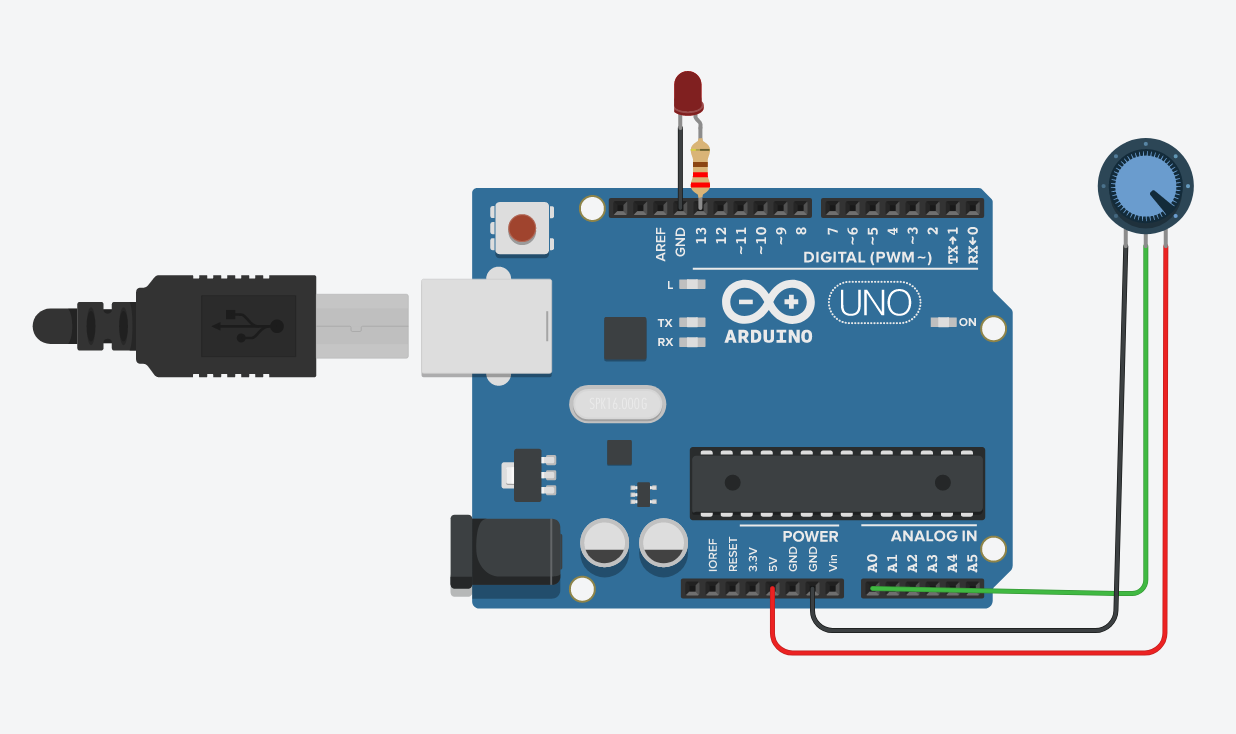
Components required
- Arduino UNO
- Potentiometer
Arduino UNO
Arduino is an opensource electronics platform based on easy-to-use hardware and software. Arduino boards are able to read inputs - light on a sensor , a finger on a button , or a twitter message - and turn it into an output - activating a motor , turning on a LED , publishing something online. To do so use the Arduino programming language (based on wiring) and the Arduino Software (IDE) based on processing.
Potentiometer
A three-terminal resistor with a sliding or revolving contact that creates a variable voltage divider is called a potentiometer. It functions as a variable resistor or rheostat if only the wiper and one end of the connector are used.
Code
int sensorPin = A0;    // select the input pin for the potentiometer
int ledPin = 13;
int sensorValue = 0;
void setup() {
pinMode(ledPin, OUTPUT);
}
void loop() {
  sensorValue = analogRead(sensorPin);
  digitalWrite(ledPin, HIGH);
  delay(sensorValue);
  digitalWrite(ledPin, LOW);
  delay(sensorValue);
}


