Black Line Follower with Arduino

To pursue a highly rewarding career, seeking for a job in challenging and healthy work environment where I can utilize my skills and knowledge efficiently for organizational growth. Seeking a beginners role to explore and enhance my technical knowledge gained at University in the last few years. I am looking for a responsible job with an opportunity for professional challenges and self development that enables me as a fresh graduate to grow while fulfilling organizational goals
In this blog, I will show you how to build a black line follower robot with an Arduino microcontroller and IR Sensors.
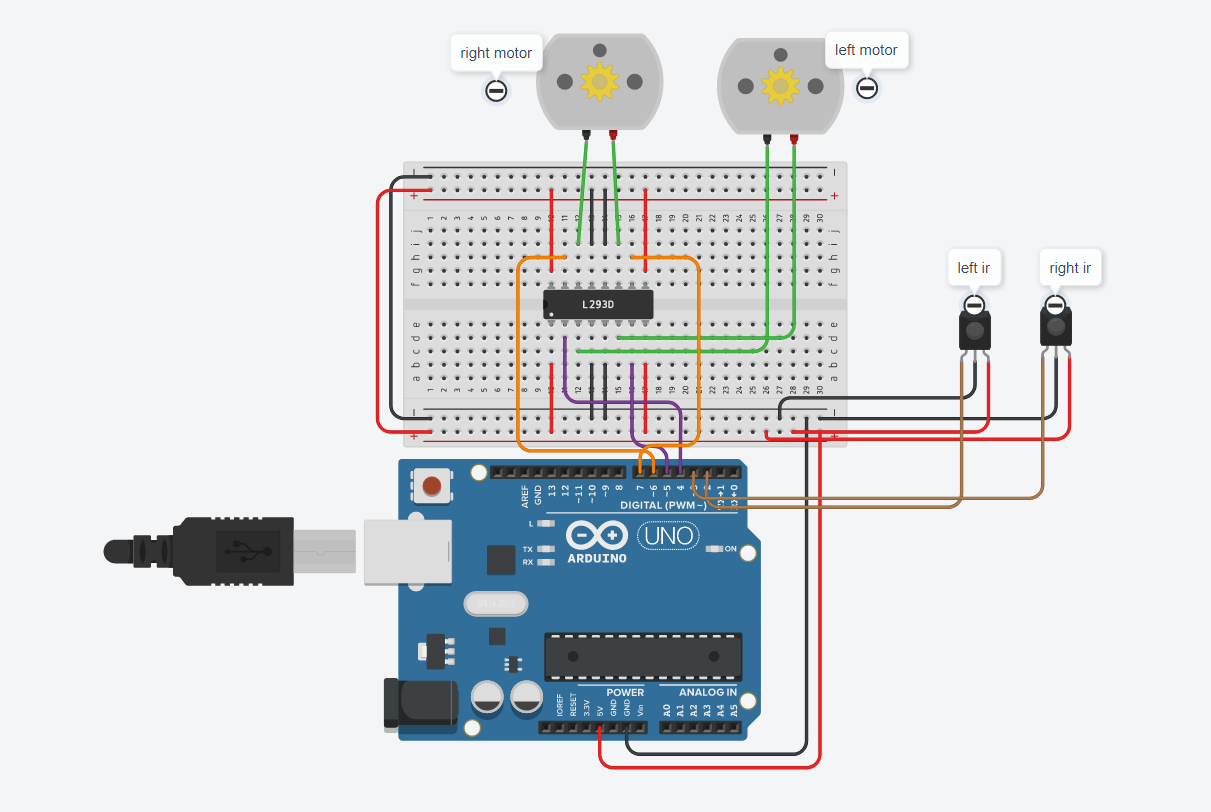
Components required
- Arduino UNO
- IR Sensor
- Gear Motors
- IC L293D
Arduino UNO
Arduino is an opensource electronics platform based on easy-to-use hardware and software. Arduino boards are able to read inputs - light on a sensor , a finger on a button , or a twitter message - and turn it into an output - activating a motor , turning on a LED , publishing something online. To do so use the Arduino programming language (based on wiring) and the Arduino Software (IDE) based on processing.
IR Sensor
An infrared sensor is an electronic device that emits and/or detects infrared radiation in order to sense some aspects of its surroundings.
Gear Motors
It is a DC motor with a gear box for decreasing the speed and increasing the torque and power . This type of motors is commonly used for robotic applications.
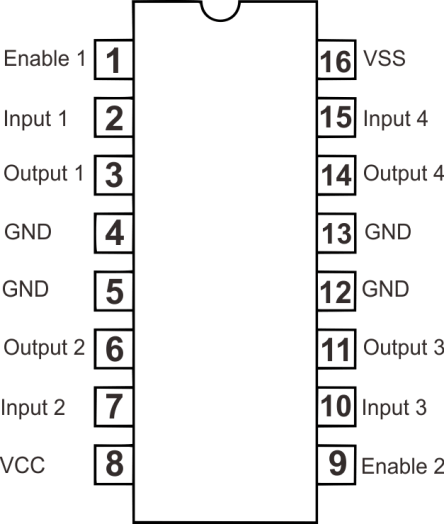
IC L293D
IC L293D is a dual H-bridge motor driver integrated circuit that can drive current of up to 600mA with voltage range of 4.5 to 36 volts.
Code
int leftir =2;
int rightir = 3;
int leftmotor =4;
int leftmotor1 = 5;
int rightmotor = 6;
int rightmotor1 = 7;

void setup() {
Serial.begin(9600);
pinMode(leftir,INPUT);
pinMode(rightir,INPUT);
pinMode(leftmotor,OUTPUT);
pinMode(leftmotor1,OUTPUT);
pinMode(rightmotor,OUTPUT);
pinMode(rightmotor1,OUTPUT);
}

void loop() {
 if(digitalRead(leftir) == HIGH && digitalRead(rightir) == HIGH);
 {
  digitalWrite(leftmotor ,HIGH);
  digitalWrite(leftmotor1,LOW);
  digitalWrite(rightmotor,HIGH);
  digitalWrite(rightmotor1,LOW);
  Serial.println("FORWARD");
  }
  if(digitalRead(leftir) == HIGH && digitalRead(rightir) == LOW);
 {
  digitalWrite(leftmotor ,HIGH);
  digitalWrite(leftmotor1,LOW);
  digitalWrite(rightmotor,LOW);
  digitalWrite(rightmotor1,HIGH);
  Serial.println("LEFT");

  }
   if(digitalRead(leftir) == LOW && digitalRead(rightir) == HIGH);
 {
  digitalWrite(leftmotor ,LOW);
  digitalWrite(leftmotor1,HIGH);
  digitalWrite(rightmotor,HIGH);
  digitalWrite(rightmotor1,LOW);
  Serial.println("RIGHT");
  }
   if(digitalRead(leftir) == LOW && digitalRead(rightir) == LOW);
 {
  digitalWrite(leftmotor ,LOW);
  digitalWrite(leftmotor1,HIGH);
  digitalWrite(rightmotor,LOW);
  digitalWrite(rightmotor1,HIGH);
  Serial.println("BACKWARD");
  }
}


