Bluetooth Controlled Robot

To pursue a highly rewarding career, seeking for a job in challenging and healthy work environment where I can utilize my skills and knowledge efficiently for organizational growth. Seeking a beginners role to explore and enhance my technical knowledge gained at University in the last few years. I am looking for a responsible job with an opportunity for professional challenges and self development that enables me as a fresh graduate to grow while fulfilling organizational goals
In this blog, I will show you how to build a bluetooth controlled robot with HC-05 bluetooth module and an Arduino microcontroller. You can use any bluetooth mobile app available in playstore to connect you mobile to bluetooth module.
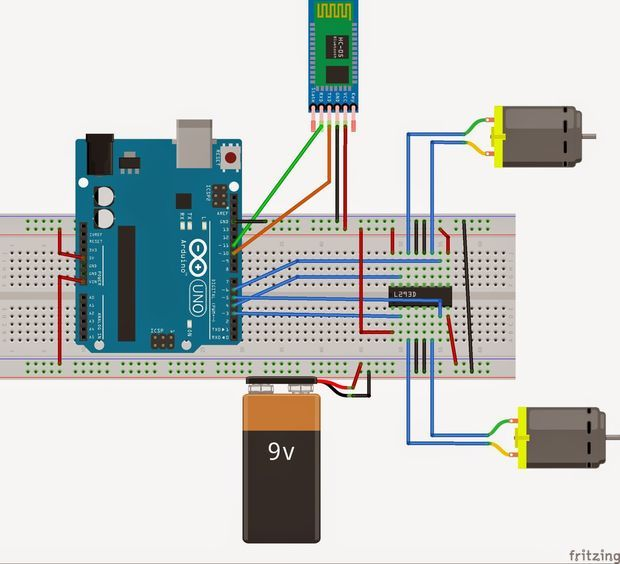
Components required
- Arduiino UNO
- HC-05
- Gear Motors
- IC L293D
Arduino UNO
Arduino is an opensource electronics platform based on easy-to-use hardware and software. Arduino boards are able to read inputs - light on a sensor , a finger on a button , or a twitter message - and turn it into an output - activating a motor , turning on a LED , publishing something online. To do so use the Arduino programming language (based on wiring) and the Arduino Software (IDE) based on processing.
HC-05 Bluetooth module
The HC-05 is a popular wireless module that can add two-way (full-duplex) functionality to your projects. You can use this module to communicate between two microcontrollers, such as Arduino, or to communicate with any Bluetooth-enabled device, such as a phone or laptop. Many Android applications are already available, making this process much easier.
Gear Motors
It is a DC motor with a gear box for decreasing the speed and increasing the torque and power . This type of motors is commonly used for robotic applications.
IC L293D
IC L293D is a dual H-bridge motor driver integrated circuit that can drive current of up to 600mA with voltage range of 4.5 to 36 volts.
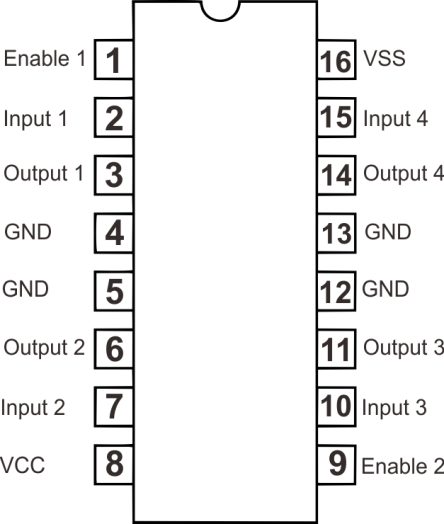
In that Bluetooth app, tapping 0 turns the motor off, while pressing 1 causes the motor 1 to spin right. Similar to this, when tapping 2 , 3 and 4, the motors 1 turns left , the motor 2 turn right and the motor 2 spins left, respectively.
Code
int motorPin1 = 3;
int motorPin2 = 4;
int motorPin3 = 5;
int motorPin4 = 6;
int state;
int flag;
void setup() {
  Serial.begin(9600);
  pinMode(3, OUTPUT);
  pinMode(4, OUTPUT);
  pinMode(5, OUTPUT);
  pinMode(6, OUTPUT);
}

void loop() {
  if (Serial.available() > 0) {
    state = Serial.read();
    flag = 0;
  }
  if (state == '0') {
    digitalWrite(3, LOW);
    digitalWrite(4, LOW);
    digitalWrite(5, LOW);
    digitalWrite(6, LOW );
    if (flag = 0) {
      Serial.println("MOTOR:off");
      flag = 1;
    }
  }
  else if (state == '1') {
    digitalWrite(3, LOW);
    digitalWrite(4, HIGH);
    if (flag == 0) {
      Serial.println("MOTOR1:right");
      flag = 1;
    }
  }
  else if (state == '2') {
    digitalWrite(3, HIGH);
    digitalWrite(4, LOW );
    if (flag == 0) {
      Serial.println("MOTOR1:left");
      flag = 1;
    }
  }
  else if (state == '3') {
    digitalWrite(5, LOW);
    digitalWrite(6, HIGH);
    if (flag == 0) {
      Serial.println("MOTOR2:right");
      flag = 1;
    }
  }
  else if (state == '4') {
    digitalWrite(5, HIGH);
    digitalWrite(6, LOW );
    if (flag == 0) {
      Serial.println("MOTOR2:LEFT");
      flag = 1;
    }
  }
}


